Tool walkthrough · 5 minutes to set up
How to schedule LinkedIn posts, with an honest pre-check built in

Published July 11, 2026
TL;DR
Open the free Post Scheduler, sign up with one email (no password), write the post, attach an image with alt text if you have one, hit Pre-check, pick the time, queue it. Connect LinkedIn once through official OAuth and queued posts publish themselves. Free in beta, 25 posts queued max.
The problem with posting consistently isn't writing. It's that the moment you write best (late, after the day's calls) and the moment your buyers scroll (weekday mornings, coffee in hand) are never the same moment. Schedulers exist to bridge that gap, and most do, blandly. This one adds the thing I actually care about: it reads the post like an editor before it ships. Here's the full walkthrough.
The six steps
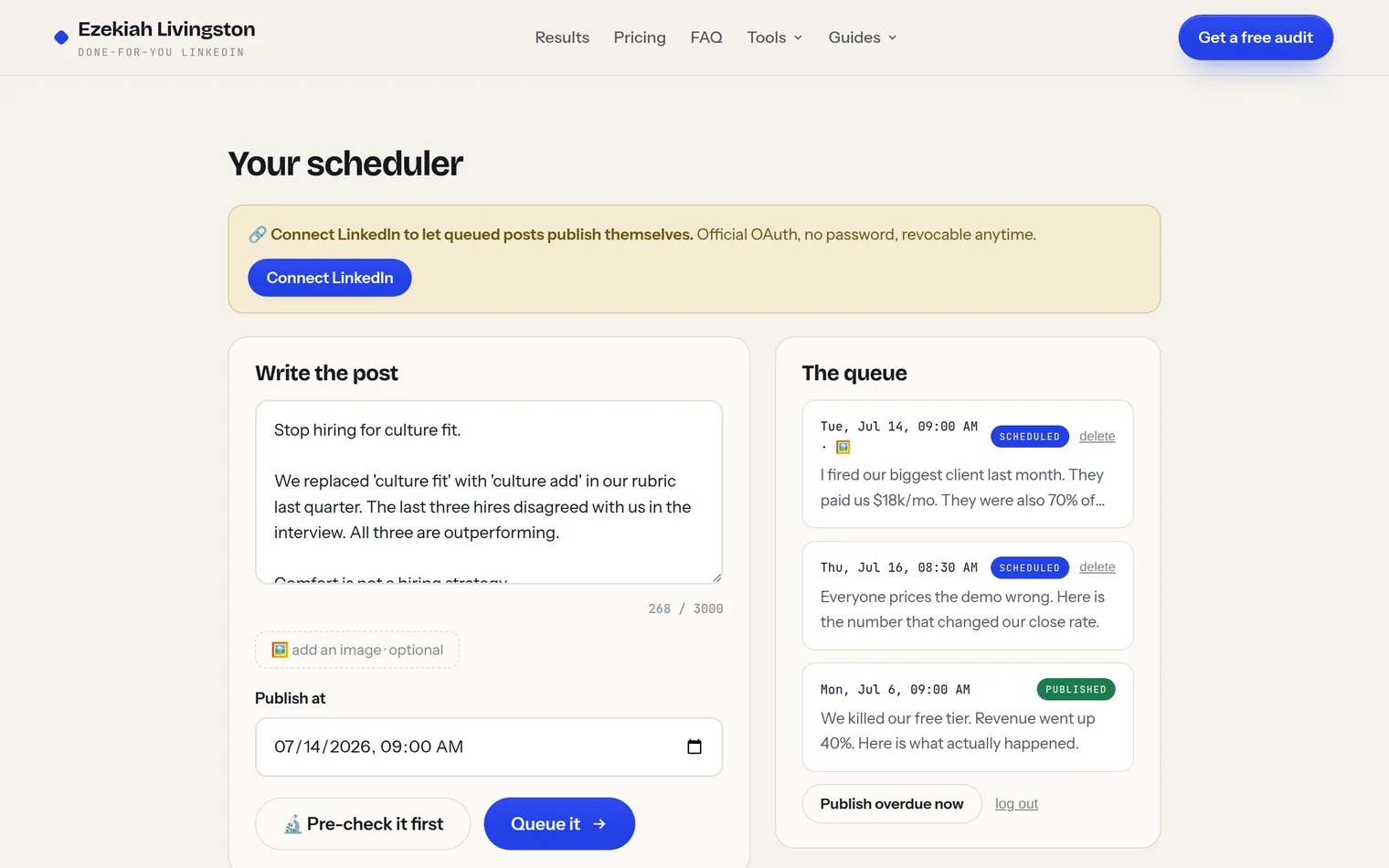
Open the scheduler, hit "Open the scheduler", enter your email, tick the consent box. No password to remember: your email keys your queue. The consent is the honest price of the free beta: occasional, actually-useful strategy emails, unsubscribe anytime.
Exactly as it should publish, line breaks and all, up to LinkedIn's real 3,000 character limit. The counter turns red near the edge. Write it like the feed reads it: the first two lines decide everything, which is why step 4 exists.
Optional, one image per post (JPG, PNG, or WebP). It's resized in your browser before upload, and the moment you attach one, an alt text field appears, the same accessibility description LinkedIn's native composer offers. Write what a screen reader should say: "Line chart: support tickets dropping 70% after firing our biggest client" beats "chart".
One click sends the draft through the same engine as the Content Audit. Hook, structure, readability, ending, substance, and the image if you attached one, each called strong or weak:
The pre-check is advice, not a gate. Queue the post anyway if you disagree; it's your voice. But catching a dead hook before it publishes beats diagnosing it from silence afterward.
Any moment from 5 minutes out to 90 days ahead. Default is tomorrow 9am, because weekday mornings, Tuesday to Thursday, in your audience's timezone are the conventional sweet spot. The queue holds up to 25 posts; delete anything until the moment it publishes.
Hit "Connect LinkedIn" and approve on linkedin.com itself. That's official OAuth: the tool never sees your password, gets exactly one permission (post on your behalf), and you can revoke it anytime under LinkedIn Settings → Data privacy → Permitted services. From then on, queued posts publish themselves.
How to tell a safe scheduler from a dangerous one
Since you're trusting something with your professional voice, apply this test to any scheduler, including mine:
Official OAuth on linkedin.com, a single narrow permission, revocable in your LinkedIn settings, no password ever typed outside linkedin.com.
Asks for your actual LinkedIn password, wants a browser extension with "read and change all your data", or automates likes/connections/DMs. That's account-ban territory.
What it can and can't do (honesty section)
- Can: text posts to 3,000 characters, one image with alt text, scheduling to the minute, the craft pre-check, a visible queue you can edit until publish time.
- Can't yet: linked @mentions (typed @names publish as plain text), multi-image and document posts, video, polls. LinkedIn's API supports several of these, and they're on the roadmap; native-only features like collaborative articles aren't.
- Won't ever: promise engagement, auto-like, auto-comment, or touch anything in your account beyond publishing the posts you queued.
One more honest note: scheduling solves consistency, not quality. If every post grades weak in the pre-check, the fix isn't a better time slot, it's better posts. Run your recent ones through the Content Audit (walkthrough here), and make sure the profile those posts point to survives its own eight seconds.
Free beta · no password · official OAuth
Tuesday 9am is waiting. Write tonight.
Queue your next post with an editor reading over your shoulder, then let it publish itself while you run your company.